Email Marketing Platforms Comparison Mailchimp vs Constant Contact vs ConvertKit
K
By Krishna Vepakomma
Sales & AI Expert
28th December 2024
13 min read
2552 words
By Krishna Vepakomma
Sales & AI Expert
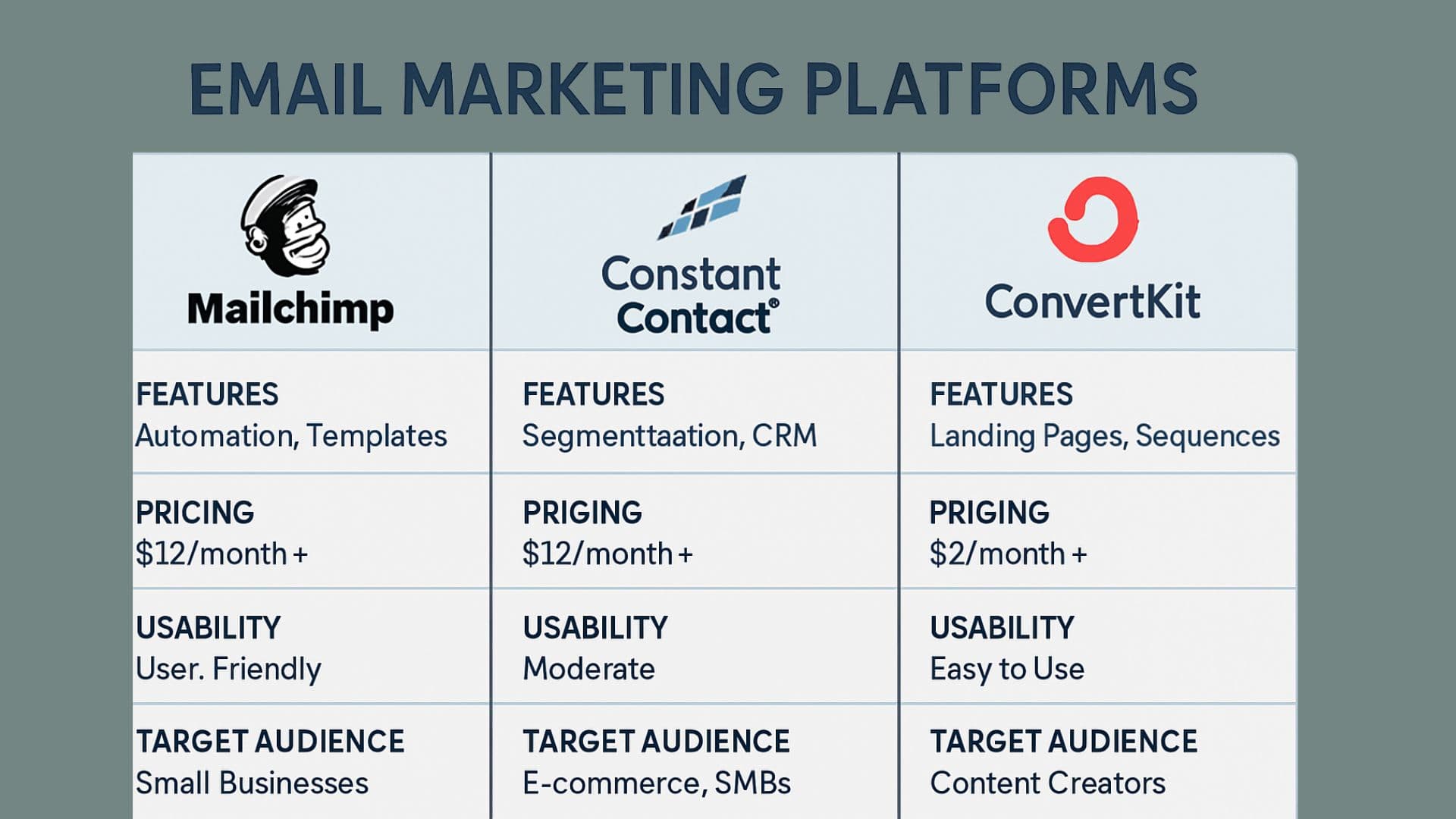
Compare top email marketing platforms including Mailchimp, Constant Contact, and ConvertKit. Detailed analysis of features, pricing, automation capabilities, and recommendations for different business types and marketing needs.
Email marketing remains one of the highest ROI marketing channels, with an average return of $42 for every $1 spent. Choosing the right email marketing platform is crucial for building effective campaigns, nurturing leads, and driving conversions. The three platforms we'll compare - Mailchimp, Constant Contact, and ConvertKit - each offer unique strengths for different business needs. These platforms serve different market segments: Mailchimp provides comprehensive features for businesses of all sizes, Constant Contact focuses on simplicity and small business needs, while ConvertKit specializes in creator and blogger-focused email marketing with advanced automation capabilities. Companies using appropriate email marketing platforms see 760% increase in revenue from segmented campaigns, 50% higher open rates with personalization, and 14.5% improvement in click-through rates with automation. Selecting the right platform can significantly impact email marketing success and business growth.
Comprehensive Feature Set: - Advanced automation: Sophisticated workflow builder and triggers - Audience segmentation: Detailed targeting and personalization options - A/B testing: Comprehensive testing capabilities for optimization - Analytics and reporting: In-depth performance analytics and insights - Multi-channel marketing: Email, social media, ads, and landing pages Design and Usability: - Template library: Extensive collection of professional email templates - Drag-and-drop editor: Intuitive design tool with customization options - Brand consistency: Logo, colors, and style integration - Mobile optimization: Responsive designs for all devices - Content suggestions: AI-powered content recommendations Integration Ecosystem: - 300+ integrations: Extensive third-party application connections - E-commerce platforms: Shopify, WooCommerce, BigCommerce integration - CRM systems: Salesforce, HubSpot, and other CRM connections - Social media: Facebook, Instagram, and social platform integration - Analytics tools: Google Analytics and conversion tracking
Pricing Complexity: - Cost scaling: Expensive as subscriber count grows - Feature limitations: Free plan has significant restrictions - Contact-based pricing: Costs increase with audience size - Premium features: Advanced features require higher-tier plans - Overage charges: Additional costs for exceeding plan limits Learning Curve: - Feature complexity: Can be overwhelming for beginners - Interface navigation: Complex interface for advanced features - Setup time: Longer implementation for advanced functionality - Training requirements: Need for user education and training - Technical knowledge: Some features require technical understanding
Ease of Use: - Simple interface: User-friendly design and navigation - Quick setup: Fast onboarding and campaign creation - Template simplicity: Easy-to-use email templates - Guided workflows: Step-by-step campaign creation process - Minimal learning curve: Quick adoption for non-technical users Customer Support: - Live support: Phone and chat support during business hours - Local workshops: In-person training and education sessions - Resource library: Comprehensive guides and tutorials - Community forums: User community and peer support - Personal guidance: One-on-one support and consultation Small Business Focus: - Affordable pricing: Cost-effective for small businesses - Event marketing: Built-in event management and promotion - Survey tools: Integrated survey and feedback collection - Social media: Social media management and posting - Local business features: Location-based marketing tools
Limited Advanced Features: - Basic automation: Limited automation and workflow capabilities - Segmentation restrictions: Fewer advanced targeting options - Design flexibility: Limited customization and design options - Analytics depth: Basic reporting and analytics capabilities - Integration limits: Fewer third-party integrations available Scalability Concerns: - Enterprise limitations: May not meet large business requirements - Advanced functionality: Limited sophisticated features for power users - Customization constraints: Fewer customization options for complex needs - API limitations: Restricted development and integration capabilities - Advanced reporting: Limited analytical insights for optimization
Creator-Focused Features: - Advanced automation: Sophisticated email sequences and workflows - Tag-based organization: Flexible subscriber organization and segmentation - Visual automation: Intuitive automation builder and flow visualization - Deliverability focus: High deliverability rates and sender reputation - Creator tools: Features specifically designed for content creators Automation Excellence: - Behavioral triggers: Action-based automation and responses - Advanced tagging: Detailed subscriber tagging and categorization - Conditional logic: Complex automation rules and conditions - Split testing: A/B testing for sequences and campaigns - Performance tracking: Detailed automation performance analytics Content Creator Tools: - Landing pages: High-converting landing page templates - Lead magnets: Opt-in forms and content delivery automation - Course integration: Educational content and course promotion - Affiliate tracking: Built-in affiliate program management - Subscriber forms: Customizable opt-in forms and pop-ups
Design Constraints: - Template limitations: Fewer email template options - Design flexibility: Limited visual customization capabilities - Brand customization: Restricted branding and design options - Visual editor: Less sophisticated design tools - Template variety: Smaller selection of pre-built templates Feature Scope: - Multi-channel limitations: Focused primarily on email marketing - E-commerce features: Limited e-commerce integration and tools - Social media: Minimal social media marketing capabilities - Survey tools: Limited survey and feedback functionality - Event marketing: Fewer event management and promotion features
Template Libraries: Mailchimp: - Template variety: 100+ professional email templates - Customization: Extensive design customization options - Responsive design: Mobile-optimized templates and previews - Brand consistency: Logo, color, and font integration - Content blocks: Drag-and-drop content elements and modules Constant Contact: - Template selection: 300+ email templates and designs - Industry-specific: Templates tailored for different industries - Easy customization: Simple editing and modification tools - Mobile preview: Mobile-responsive design and preview - Photo library: Built-in stock photo library and tools ConvertKit: - Minimal templates: Limited template selection and variety - Simple design: Clean, text-focused email templates - Content focus: Emphasis on content over visual design - Mobile optimization: Responsive templates for all devices - Custom HTML: Option for custom HTML email creation
Automation Capabilities: Mailchimp: - Workflow builder: Visual automation builder with conditions - Trigger options: Multiple trigger types and conditions - Customer journeys: Complex multi-step automation sequences - Behavioral targeting: Action-based automation and responses - E-commerce automation: Purchase-based triggers and follow-ups Constant Contact: - Basic automation: Simple autoresponder and welcome series - Drip campaigns: Scheduled email sequences and campaigns - Trigger emails: Basic behavioral triggers and responses - List automation: Simple list management and organization - Birthday campaigns: Date-based automation and messaging ConvertKit: - Advanced automation: Sophisticated workflow creation and management - Visual workflows: Intuitive automation flow visualization - Tag-based logic: Complex tagging and subscriber organization - Conditional branching: Advanced logic and decision trees - Sequence optimization: Performance tracking and optimization tools
Performance Tracking: Mailchimp: - Comprehensive analytics: Detailed performance metrics and insights - Revenue tracking: E-commerce integration and revenue attribution - Audience insights: Subscriber behavior and engagement analysis - Comparative reports: A/B testing results and optimization recommendations - Goal tracking: Conversion tracking and ROI measurement Constant Contact: - Basic reporting: Standard email performance metrics - Engagement tracking: Open rates, click rates, and bounce rates - List growth: Subscriber acquisition and retention tracking - Social media: Social sharing and engagement metrics - Survey analytics: Survey response and feedback analysis ConvertKit: - Creator analytics: Metrics focused on content creator needs - Subscriber insights: Detailed subscriber behavior and preferences - Automation performance: Workflow effectiveness and optimization - Revenue reporting: Sales and conversion tracking capabilities - Growth tracking: Audience growth and engagement trends
Plan Tiers: - Free: $0 for up to 2,000 contacts and 10,000 emails/month - Essentials: $10/month for 500 contacts with basic automation - Standard: $15/month for 500 contacts with advanced features - Premium: $299/month for 10,000 contacts with full features Pricing Considerations: - Contact-based scaling: Costs increase significantly with audience growth - Feature restrictions: Free plan has Mailchimp branding and limited features - Overage charges: Additional costs for exceeding email send limits - Premium features: Advanced features require higher-tier subscriptions - Add-on costs: Additional expenses for extra features and integrations
Plan Options: - Core: $20/month for up to 500 contacts with basic features - Plus: $45/month for up to 500 contacts with advanced tools - Pro: Custom pricing for larger organizations and enterprises Pricing Benefits: - Free trial: 60-day free trial with full feature access - Transparent pricing: Clear, predictable pricing structure - Contact scaling: Reasonable price increases with audience growth - Feature inclusion: Most features available across all plans - Support included: Customer support included in all plans
Subscription Tiers: - Free: $0 for up to 1,000 subscribers with basic features - Creator: $29/month for 1,000 subscribers with automation - Creator Pro: $59/month for 1,000 subscribers with advanced features Pricing Structure: - Subscriber-based: Pricing based on number of subscribers - Unlimited emails: No restrictions on email sending volume - Feature consistency: Core features available across all paid plans - Transparent scaling: Clear pricing for subscriber growth - No contracts: Month-to-month subscription flexibility
Mailchimp Integrations: - E-commerce: Shopify, WooCommerce, Magento, BigCommerce - CRM: Salesforce, HubSpot, Pipedrive, Zoho - Social media: Facebook, Instagram, Twitter, LinkedIn - Analytics: Google Analytics, Facebook Pixel, conversion tracking - Productivity: Zapier, Microsoft Office, Google Workspace Constant Contact Integrations: - E-commerce: Shopify, WooCommerce, BigCommerce integration - CRM: Salesforce, QuickBooks, Microsoft Office integration - Social media: Facebook, Instagram, and social platform connections - Event platforms: Eventbrite and event management integration - Survey tools: SurveyMonkey and feedback collection integration ConvertKit Integrations: - Course platforms: Teachable, Thinkific, Kajabi integration - E-commerce: Shopify, Gumroad, WooCommerce connections - Payment: Stripe, PayPal, and payment processor integration - Membership: WordPress, membership site integration - Analytics: Google Analytics and conversion tracking
Comprehensive Marketing Needs: - Multi-channel marketing: Need for email, social, and ad integration - E-commerce business: Online store with product recommendations - Advanced segmentation: Complex audience targeting and personalization - A/B testing: Extensive testing and optimization requirements - Enterprise features: Large organization with sophisticated needs Growth and Scalability: - Expanding business: Growing subscriber base and marketing complexity - Integration requirements: Need for extensive third-party connections - Advanced analytics: Detailed reporting and performance insights - Team collaboration: Multiple users and collaboration features - Brand consistency: Professional branding and design requirements
Small Business Focus: - Simple email marketing: Straightforward email campaigns and newsletters - Local business: Event marketing and local customer engagement - Limited technical skills: Need for easy-to-use platform and support - Quick implementation: Fast setup and campaign launch requirements - Personal support: Value live customer support and training Traditional Marketing: - Newsletter publishing: Regular newsletter and update distribution - Event promotion: Event marketing and registration management - Survey collection: Customer feedback and survey distribution - Social media: Basic social media management and posting - Community building: Local business and community engagement
Content Creator Needs: - Blogger or creator: Content creation and audience building focus - Course selling: Educational content and course promotion - Lead magnets: Opt-in content and lead generation strategies - Advanced automation: Sophisticated email sequences and workflows - High deliverability: Premium email deliverability and sender reputation Creator Business Model: - Audience monetization: Converting subscribers to customers - Product launches: Coordinated launch campaigns and sequences - Affiliate marketing: Affiliate program management and tracking - Membership sites: Subscription-based content and community - Personal branding: Individual creator or consultant marketing
Mailchimp Advanced Features: - Predictive insights: AI-powered recommendations and optimization - Dynamic content: Personalized content based on subscriber data - Customer lifetime value: CLV prediction and segmentation - Send time optimization: AI-determined optimal sending times - Product recommendations: E-commerce product suggestion automation Constant Contact Features: - Behavioral automation: Basic behavioral triggers and responses - Dynamic content: Simple personalization and customization - List segmentation: Basic audience segmentation and targeting - Welcome series: Automated welcome and onboarding sequences - Birthday campaigns: Date-based automation and messaging ConvertKit Advanced Features: - Visual automation: Sophisticated workflow builder and logic - Subscriber scoring: Lead scoring and engagement tracking - Tag-based automation: Complex tagging and subscriber organization - Conditional content: Dynamic content based on subscriber attributes - Revenue attribution: Sales tracking and revenue attribution
Email Deliverability: - Mailchimp: Strong deliverability with dedicated IP options - Constant Contact: Good deliverability with ISP relationships - ConvertKit: Excellent deliverability focus and sender reputation Performance Optimization: - Mailchimp: AI-powered optimization and recommendations - Constant Contact: Basic optimization suggestions and best practices - ConvertKit: Creator-focused optimization and performance tracking
Data Export/Import: - Contact migration: Subscriber list transfer and data preservation - Campaign history: Historical campaign data and performance - Automation setup: Workflow recreation and optimization - Template migration: Design transfer and customization - Integration setup: Third-party connection and configuration Implementation Timeline: - Basic setup: 1-2 weeks for platform configuration - Data migration: 1-2 weeks for contact and campaign transfer - Training: 1-2 weeks for team education and adoption - Testing: 1-2 weeks for campaign testing and optimization - Full deployment: 4-6 weeks for complete implementation
Emerging Trends: - AI integration: Machine learning for personalization and optimization - Interactive emails: Enhanced engagement and functionality - Mobile-first design: Responsive and mobile-optimized experiences - Privacy compliance: GDPR, CCPA, and privacy regulation adherence - Cross-channel integration: Unified marketing across multiple channels Technology Advancement: - Predictive analytics: Advanced forecasting and subscriber insights - Real-time personalization: Dynamic content and messaging - Voice integration: Voice-activated email and marketing features - Blockchain verification: Enhanced deliverability and authentication - Automation intelligence: Smart automation and workflow optimization
Business Requirements: - Company size: Number of subscribers and team members - Industry needs: Specific features and compliance requirements - Marketing complexity: Sophistication of campaigns and automation - Integration needs: Required connections to existing tools - Growth plans: Scalability and expansion requirements Technical Considerations: - Technical expertise: Available skills for platform management - Design requirements: Visual design and branding needs - Automation complexity: Workflow sophistication and logic - Reporting needs: Analytics depth and insight requirements - Deliverability priority: Email delivery and sender reputation importance
ActiveCampaign: - Advanced automation: Sophisticated workflow and CRM integration - Sales automation: Combined email marketing and sales tools - Machine learning: AI-powered optimization and insights - Multi-channel: Email, SMS, and social media integration GetResponse: - All-in-one platform: Email, landing pages, and webinar tools - Marketing automation: Advanced workflow and funnel creation - Conversion funnel: Complete customer journey management - Webinar integration: Built-in webinar and event hosting AWeber: - Creator focus: Blogger and small business specialization - Simple automation: Easy-to-use autoresponder and sequences - Template variety: Extensive template library and customization - Deliverability: Strong focus on email delivery and reputation
Choosing the right email marketing platform depends on your specific business needs, technical requirements, and growth objectives. Mailchimp offers comprehensive features for businesses requiring advanced capabilities, Constant Contact provides simplicity for small businesses, and ConvertKit excels for content creators and advanced automation needs. Consider your current requirements, future growth plans, and team capabilities when making your decision. Most platforms offer free trials, so testing multiple options with your actual use cases can help ensure you choose the best fit for your email marketing success. Whether you prioritize ease of use, advanced features, or creator-focused tools, selecting the right email marketing platform can significantly improve your marketing results and business growth. Ready to optimize your email marketing performance? Explore Inleads.ai's email marketing analytics platform and discover how intelligent insights can enhance your email campaigns across any platform.
Discover more insights about AI sales tools and analytics